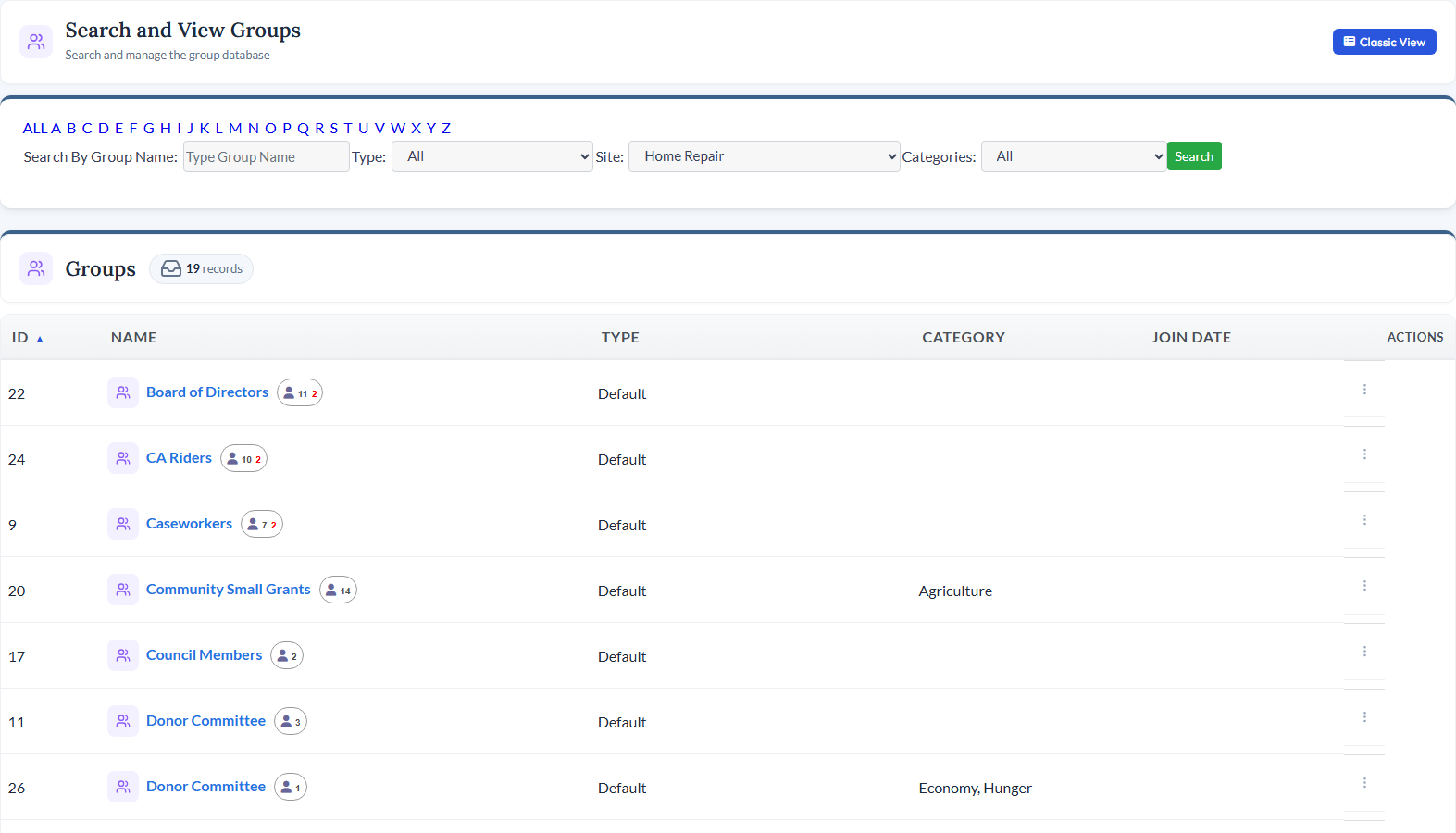
<div class="module-page"> <!-- ============================================ 1. MODULE INTRO ============================================ --> <div class="mp-intro"> <div class="mp-icon" style="background-color: rgba(249, 115, 22, 0.15);"> <i data-lucide="layers" style="color: #F97316;"></i> </div> <h1>Groups Management</h1> <p class="mp-tagline">Committees, Boards, Teams, and More - All Organized</p> <p class="mp-description"> Manage every kind of group your organization needs - committees, advisory boards, volunteer teams, affinity groups, and beyond. Track members, sync email lists, connect to forms and jobs, and let group leaders manage their own rosters from the front-end website. </p> <div class="mp-cta-buttons"> <a href="/request-demo" class="btn btn-primary">Request a Demo</a> <a href="/pricing" class="btn btn-outline">View Pricing</a> </div> </div> <!-- ============================================ 2. PRODUCT SCREENSHOT ============================================ --> <div class="mp-screenshot"> <img src="/_data/global/images/moduleimages/updatedmodules/GroupsModule2022.jpg" alt="CitySoft Groups Management module showing group records and member lists"> </div> <!-- ============================================ 3. KEY CAPABILITIES GRID ============================================ --> <div class="mp-section"> <h2 class="mp-section-title">What You Can Do</h2> <div class="mp-capabilities"> <!-- Capability 1 --> <div class="mp-capability-card"> <div class="mp-capability-icon" style="background-color: rgba(249, 115, 22, 0.15);"> <i data-lucide="mail" style="color: #F97316;"></i> </div> <h3>Synced Email Lists</h3> <p>Create an email list directly from any group and it stays in sync automatically. When contacts are added or removed from the group, the email list updates so only current members receive messages.</p> </div> <!-- Capability 2 --> <div class="mp-capability-card"> <div class="mp-capability-icon" style="background-color: rgba(249, 115, 22, 0.15);"> <i data-lucide="user-cog" style="color: #F97316;"></i> </div> <h3>Self-Service for Group Leaders</h3> <p>Primary contacts in a group can log into the website and manage their group's roster through the Manage Your Profile area - updating records of regular contacts without needing full admin access.</p> </div> <!-- Capability 3 --> <div class="mp-capability-card"> <div class="mp-capability-icon" style="background-color: rgba(249, 115, 22, 0.15);"> <i data-lucide="briefcase" style="color: #F97316;"></i> </div> <h3>Jobs &amp; Volunteer Integration</h3> <p>Link groups directly to jobs or volunteer positions. When someone applies through an online form, they are automatically placed into the associated group - no manual data entry needed.</p> </div> <!-- Capability 4 --> <div class="mp-capability-card"> <div class="mp-capability-icon" style="background-color: rgba(249, 115, 22, 0.15);"> <i data-lucide="tags" style="color: #F97316;"></i> </div> <h3>Categories &amp; Custom Types</h3> <p>Use categories for simple tagging across modules, or define group types with fully customizable forms - so your "Committees" type can have different fields than your "Volunteer Teams" type.</p> </div> <!-- Capability 5 --> <div class="mp-capability-card"> <div class="mp-capability-icon" style="background-color: rgba(249, 115, 22, 0.15);"> <i data-lucide="globe" style="color: #F97316;"></i> </div> <h3>Front-End Join &amp; Leave</h3> <p>Groups can be made available on membership forms, event registration forms, and the Manage Your Profile area so users can join or leave groups themselves from the website.</p> </div> <!-- Capability 6 --> <div class="mp-capability-card"> <div class="mp-capability-icon" style="background-color: rgba(249, 115, 22, 0.15);"> <i data-lucide="text-cursor-input" style="color: #F97316;"></i> </div> <h3>Flexible Naming</h3> <p>Alias "Groups" to any word that fits your organization - committees, teams, chapters, councils, or anything else - and that label appears throughout the entire platform UI.</p> </div> </div> </div> <!-- ============================================ 4. RELATED MODULES ============================================ --> <div class="mp-section"> <h2 class="mp-section-title">Works Great With</h2> <div class="mp-related"> <!-- Related Module 1: Email --> <a href="/modules/email" class="mp-related-card"> <div class="mp-related-icon" style="background-color: rgba(239, 68, 68, 0.15);"> <i data-lucide="mail" style="color: #EF4444;"></i> </div> <h3>Email</h3> <p>Create email lists that sync automatically with your groups so messages always reach current members.</p> <div class="card-link"> <span>Learn more</span> <i data-lucide="arrow-right"></i> </div> </a> <!-- Related Module 2: Contacts --> <a href="/modules/contacts" class="mp-related-card"> <div class="mp-related-icon" style="background-color: rgba(59, 130, 246, 0.15);"> <i data-lucide="circle-user-round" style="color: #3B82F6;"></i> </div> <h3>Contacts</h3> <p>Every group member is a contact record - track roles, activities, and interactions across the platform.</p> <div class="card-link"> <span>Learn more</span> <i data-lucide="arrow-right"></i> </div> </a> <!-- Related Module 3: Volunteers --> <a href="/modules/volunteers" class="mp-related-card"> <div class="mp-related-icon" style="background-color: rgba(34, 197, 94, 0.15);"> <i data-lucide="heart-handshake" style="color: #22C55E;"></i> </div> <h3>Volunteers</h3> <p>Link groups to volunteer positions and jobs so applicants are automatically placed into the right group.</p> <div class="card-link"> <span>Learn more</span> <i data-lucide="arrow-right"></i> </div> </a> </div> </div> <!-- ============================================ 5. BOTTOM CTA ============================================ --> <div class="mp-bottom-cta"> <h3>See Groups Management in Action</h3> <p>Schedule a personalized demo and see how CitySoft can help you organize and manage your groups.</p> <a href="/request-demo" class="btn">Request a Demo</a> </div> </div>