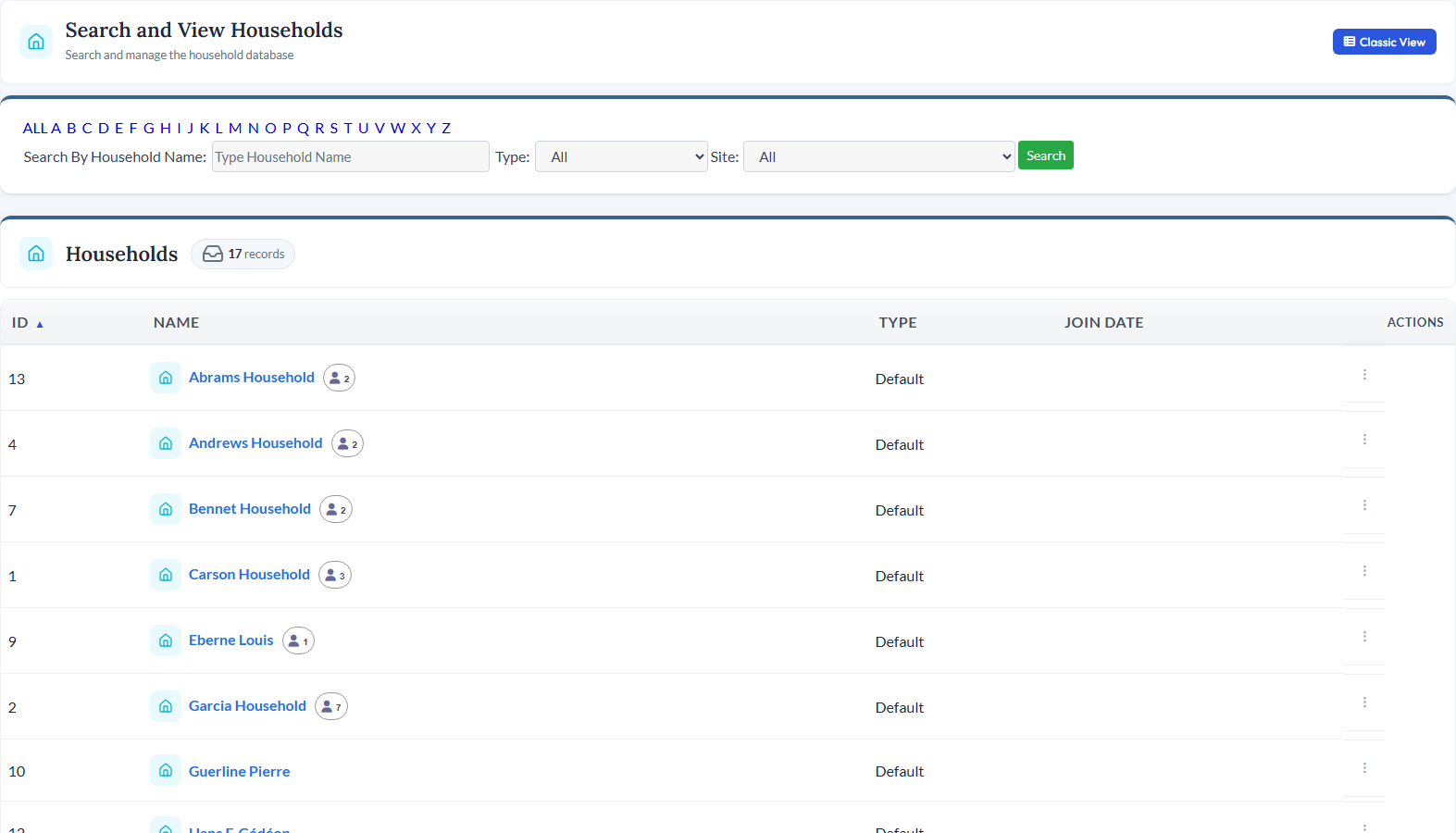
<div class="module-page"> <!-- ============================================ 1. MODULE INTRO ============================================ --> <div class="mp-intro"> <div class="mp-icon" style="background-color: rgba(6, 182, 212, 0.15);"> <i data-lucide="home" style="color: #06B6D4;"></i> </div> <h1>Household Management</h1> <p class="mp-tagline">Connect People, Families, and Addresses in One View</p> <p class="mp-description"> Group contacts into households and families so you can see the full picture of who lives together, manage shared addresses, create proper mailing salutations, and track household-level giving - all while keeping individual contact records intact. </p> <div class="mp-cta-buttons"> <a href="/request-demo" class="btn btn-primary">Request a Demo</a> <a href="/pricing" class="btn btn-outline">View Pricing</a> </div> </div> <!-- ============================================ 2. PRODUCT SCREENSHOT ============================================ --> <div class="mp-screenshot"> <img src="/_data/global/images/moduleimages/updatedmodules/householdsmodule2022.jpg" alt="CitySoft Household Management module showing household records and linked contacts"> </div> <!-- ============================================ 3. KEY CAPABILITIES GRID ============================================ --> <div class="mp-section"> <h2 class="mp-section-title">What You Can Do</h2> <div class="mp-capabilities"> <!-- Capability 1 --> <div class="mp-capability-card"> <div class="mp-capability-icon" style="background-color: rgba(6, 182, 212, 0.15);"> <i data-lucide="users" style="color: #06B6D4;"></i> </div> <h3>Link Contacts to Households</h3> <p>Associate individual contacts with household records so you can see at a glance who belongs to each family - and view all their shared activities, donations, and addresses together.</p> </div> <!-- Capability 2 --> <div class="mp-capability-card"> <div class="mp-capability-icon" style="background-color: rgba(6, 182, 212, 0.15);"> <i data-lucide="mail" style="color: #06B6D4;"></i> </div> <h3>Contact Info, Mailing Names &amp; Salutations</h3> <p>Each household has its own Contact Information screen with shared address, phone, and special donor-style fields like Mailing Name and Salutation for polished, personalized mail merges.</p> </div> <!-- Capability 3 --> <div class="mp-capability-card"> <div class="mp-capability-icon" style="background-color: rgba(6, 182, 212, 0.15);"> <i data-lucide="heart-handshake" style="color: #06B6D4;"></i> </div> <h3>Household-Level Giving</h3> <p>Donations can be tagged to households as well as to the individual contacts within them, so you can view combined family giving alongside each person's contributions.</p> </div> <!-- Capability 4 --> <div class="mp-capability-card"> <div class="mp-capability-icon" style="background-color: rgba(6, 182, 212, 0.15);"> <i data-lucide="user-cog" style="color: #06B6D4;"></i> </div> <h3>Self-Service for Family Members</h3> <p>A parent or head of household can log into the website and update family members' records through the Linked Contacts feature in Manage Your Profile - no admin involvement needed to keep the family's information current.</p> </div> <!-- Capability 5 --> <div class="mp-capability-card"> <div class="mp-capability-icon" style="background-color: rgba(6, 182, 212, 0.15);"> <i data-lucide="pencil-ruler" style="color: #06B6D4;"></i> </div> <h3>Custom Forms &amp; Fields</h3> <p>Create custom household forms to track different information for different types of households - with user-defined fields tailored to your organization's needs.</p> </div> <!-- Capability 6 --> <div class="mp-capability-card"> <div class="mp-capability-icon" style="background-color: rgba(6, 182, 212, 0.15);"> <i data-lucide="file-bar-chart" style="color: #06B6D4;"></i> </div> <h3>Reporting &amp; Exports</h3> <p>A dedicated Households report template in the Reports module lets you create and export filtered reports on household records, linked contacts, donations, and custom fields.</p> </div> </div> </div> <!-- ============================================ 4. RELATED MODULES ============================================ --> <div class="mp-section"> <h2 class="mp-section-title">Works Great With</h2> <div class="mp-related"> <!-- Related Module 1: Contacts --> <a href="/modules/contacts" class="mp-related-card"> <div class="mp-related-icon" style="background-color: rgba(59, 130, 246, 0.15);"> <i data-lucide="circle-user-round" style="color: #3B82F6;"></i> </div> <h3>Contacts</h3> <p>Every household member is a contact record - link individuals to families while keeping their own profiles and history intact.</p> <div class="card-link"> <span>Learn more</span> <i data-lucide="arrow-right"></i> </div> </a> <!-- Related Module 2: Email --> <a href="/modules/email" class="mp-related-card"> <div class="mp-related-icon" style="background-color: rgba(239, 68, 68, 0.15);"> <i data-lucide="mail" style="color: #EF4444;"></i> </div> <h3>Email</h3> <p>Use household mailing names and salutations to send personalized, properly addressed communications to families.</p> <div class="card-link"> <span>Learn more</span> <i data-lucide="arrow-right"></i> </div> </a> <!-- Related Module 3: Reports --> <a href="/modules/reports" class="mp-related-card"> <div class="mp-related-icon" style="background-color: rgba(139, 92, 246, 0.15);"> <i data-lucide="bar-chart-3" style="color: #8B5CF6;"></i> </div> <h3>Reports</h3> <p>Run reports across household data including linked contacts, donations, and custom fields for deeper analysis.</p> <div class="card-link"> <span>Learn more</span> <i data-lucide="arrow-right"></i> </div> </a> </div> </div> <!-- ============================================ 5. BOTTOM CTA ============================================ --> <div class="mp-bottom-cta"> <h3>See Household Management in Action</h3> <p>Schedule a personalized demo and see how CitySoft can help you manage household and family records.</p> <a href="/request-demo" class="btn">Request a Demo</a> </div> </div>