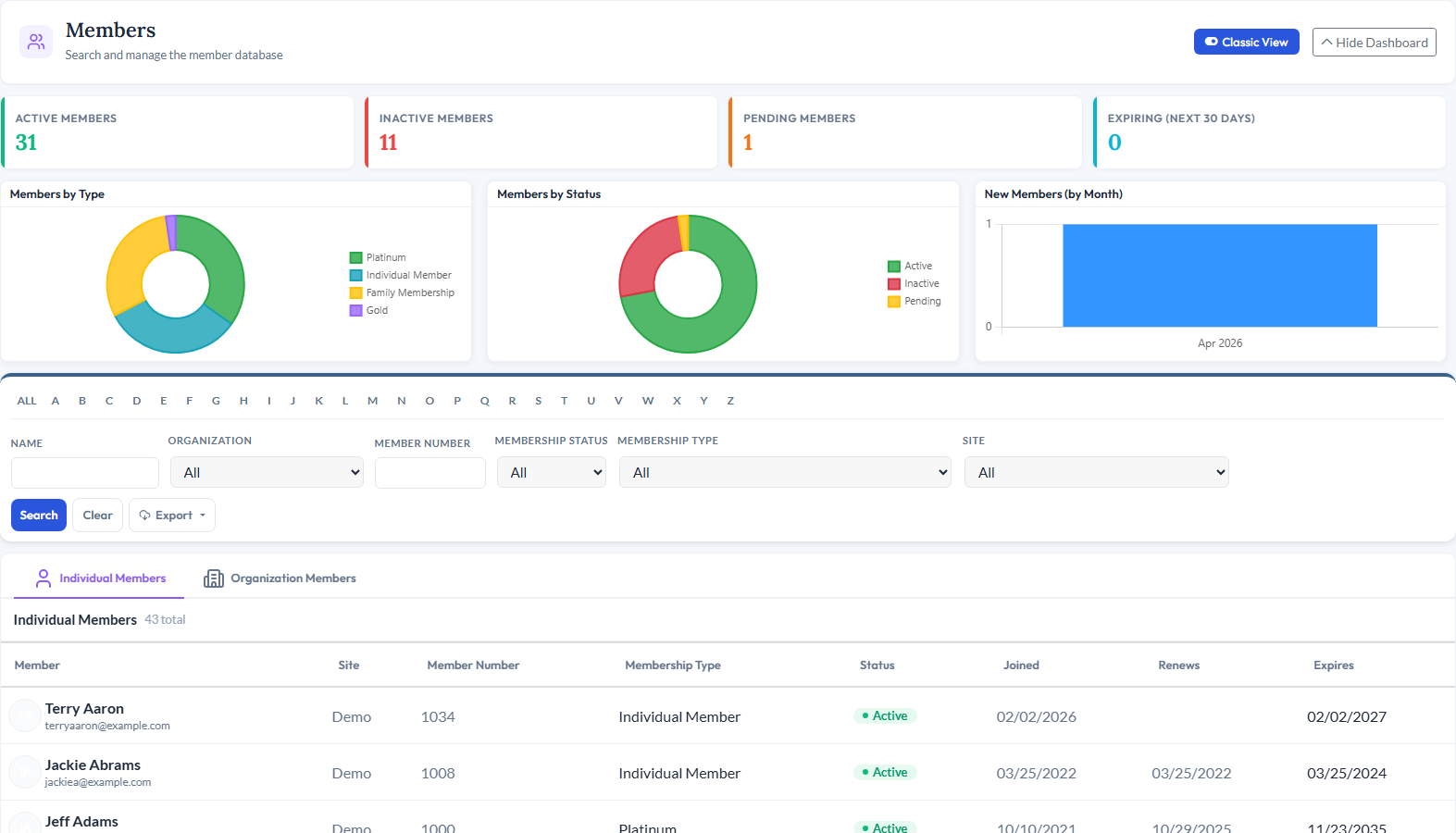
<div class="module-page"> <!-- ============================================ 1. MODULE INTRO ============================================ --> <div class="mp-intro"> <div class="mp-icon" style="background-color: rgba(139, 92, 246, 0.15);"> <i data-lucide="users" style="color: #8B5CF6;"></i> </div> <h1>Membership Management</h1> <p class="mp-tagline">Join, Renew, and Manage - Online and Automated</p> <p class="mp-description"> Handle every aspect of membership for individuals and organizations - online registration, automated renewal reminders, self-service profile updates, members-only content, and detailed reporting. Members join and renew on your website while the platform keeps everything organized behind the scenes. </p> <div class="mp-cta-buttons"> <a href="/request-demo" class="btn btn-primary">Request a Demo</a> <a href="/pricing" class="btn btn-outline">View Pricing</a> </div> </div> <!-- ============================================ 2. PRODUCT SCREENSHOT ============================================ --> <div class="mp-screenshot"> <!-- Membership dashboard or module screenshot - update path if using new dashboard image --> <img src="/_data/global/images/moduleimages/updatedmodules/membership2022.jpg" alt="CitySoft Membership Management module showing membership dashboard and member records"> </div> <!-- ============================================ 3. KEY CAPABILITIES GRID ============================================ --> <div class="mp-section"> <h2 class="mp-section-title">What You Can Do</h2> <div class="mp-capabilities"> <!-- Capability 1 --> <div class="mp-capability-card"> <div class="mp-capability-icon" style="background-color: rgba(139, 92, 246, 0.15);"> <i data-lucide="bell-ring" style="color: #8B5CF6;"></i> </div> <h3>Automated Renewal Reminders</h3> <p>Set up custom-designed reminder emails with merge fields on a schedule - 90 days before expiration, 5 days after, or any interval you choose - so members are always prompted to renew on time.</p> </div> <!-- Capability 2 --> <div class="mp-capability-card"> <div class="mp-capability-icon" style="background-color: rgba(139, 92, 246, 0.15);"> <i data-lucide="globe" style="color: #8B5CF6;"></i> </div> <h3>Online Join &amp; Renew</h3> <p>Individuals and organizations can register and renew their memberships directly on your website. Confirmation emails are sent automatically and can be fully customized.</p> </div> <!-- Capability 3 --> <div class="mp-capability-card"> <div class="mp-capability-icon" style="background-color: rgba(139, 92, 246, 0.15);"> <i data-lucide="settings" style="color: #8B5CF6;"></i> </div> <h3>Flexible Membership Types</h3> <p>Create membership types for individuals or organizations with either a fixed end date (e.g., 12/31) or a rolling duration (e.g., 12 months from date joined) - whatever fits your membership model.</p> </div> <!-- Capability 4 --> <div class="mp-capability-card"> <div class="mp-capability-icon" style="background-color: rgba(139, 92, 246, 0.15);"> <i data-lucide="user-pen" style="color: #8B5CF6;"></i> </div> <h3>Self-Service Profiles</h3> <p>Both individual and organization members can update their profiles online, including custom fields - reducing admin work and keeping your data current.</p> </div> <!-- Capability 5 --> <div class="mp-capability-card"> <div class="mp-capability-icon" style="background-color: rgba(139, 92, 246, 0.15);"> <i data-lucide="mail" style="color: #8B5CF6;"></i> </div> <h3>Auto-Updating Email Lists</h3> <p>The Email module automatically maintains lists like "All Active Members" and "All Inactive Members." Create segmented member email lists via the Reports module that stay in sync as membership status changes.</p> </div> <!-- Capability 6 --> <div class="mp-capability-card"> <div class="mp-capability-icon" style="background-color: rgba(139, 92, 246, 0.15);"> <i data-lucide="lock" style="color: #8B5CF6;"></i> </div> <h3>Members-Only Content</h3> <p>Restrict website content, documents, and online communities to active members - giving them a reason to stay current and providing exclusive value for their membership.</p> </div> </div> </div> <!-- ============================================ 4. RELATED MODULES ============================================ --> <div class="mp-section"> <h2 class="mp-section-title">Works Great With</h2> <div class="mp-related"> <!-- Related Module 1: Email --> <a href="/modules/email" class="mp-related-card"> <div class="mp-related-icon" style="background-color: rgba(239, 68, 68, 0.15);"> <i data-lucide="mail" style="color: #EF4444;"></i> </div> <h3>Email</h3> <p>Send newsletters and communications to auto-updating membership lists that always reflect current active and inactive members.</p> <div class="card-link"> <span>Learn more</span> <i data-lucide="arrow-right"></i> </div> </a> <!-- Related Module 2: Contacts --> <a href="/modules/contacts" class="mp-related-card"> <div class="mp-related-icon" style="background-color: rgba(59, 130, 246, 0.15);"> <i data-lucide="circle-user-round" style="color: #3B82F6;"></i> </div> <h3>Contacts</h3> <p>Every member is a contact record with a full profile, interaction history, and connections to other modules across the platform.</p> <div class="card-link"> <span>Learn more</span> <i data-lucide="arrow-right"></i> </div> </a> <!-- Related Module 3: Events --> <a href="/modules/events" class="mp-related-card"> <div class="mp-related-icon" style="background-color: rgba(245, 158, 11, 0.15);"> <i data-lucide="calendar" style="color: #F59E0B;"></i> </div> <h3>Events</h3> <p>Create and manage member events with online registration, member-only pricing, and attendance tracking tied to membership records.</p> <div class="card-link"> <span>Learn more</span> <i data-lucide="arrow-right"></i> </div> </a> </div> </div> <!-- ============================================ 5. BOTTOM CTA ============================================ --> <div class="mp-bottom-cta"> <h3>See Membership Management in Action</h3> <p>Schedule a personalized demo and see how CitySoft can streamline your membership operations.</p> <a href="/request-demo" class="btn">Request a Demo</a> </div> </div>